– Intelligent Code Analysis & Recommendations for Apex
What you will learn
- What is ApexGuru?
- Why ApexGuru?
- Who will benefit?
- Analysis with Live Examples?
As our organization continues to expand its digital footprint, the role of Salesforce has become increasingly mission-critical. With multiple Salesforce instances supporting diverse business units, ensuring consistency, code quality, and performance has become both a challenge and an opportunity. Now is the time to seize that opportunity.
What is ApexGuru?
ApexGuru is an advanced platform purpose-built for Salesforce engineering teams. It offers real-time insights into code health, technical debt, and performance metrics. Unlike generic monitoring tools, ApexGuru is deeply integrated into the Salesforce development lifecycle, offering actionable intelligence tailored to our needs.
Why ApexGuru?
ApexGuru enables us to overcome these obstacles through:
- Standardization Across Orgs: Enforce consistent coding and architectural standards.
- Risk Mitigation: Identify performance bottlenecks, security vulnerabilities, and technical debt before they affect end users.
- Productivity Gains: Empower development teams with clear insights and reduce time spent on code reviews and rework.
- Strategic Visibility for Leaders: Provide dashboards and metrics that help leadership assess org health and allocate resources effectively.
Features
•For Developers/Reviewers:
Catch issues early, improve skills, write cleaner code. Not only static but run-time errors as well.
•For Architects:
Enforce enterprise standards across teams
•For Managers:
Visibility into team code quality, faster reviews
•For DevOps:
Integrates into CI/CD tools for smoother deployments
Examples:
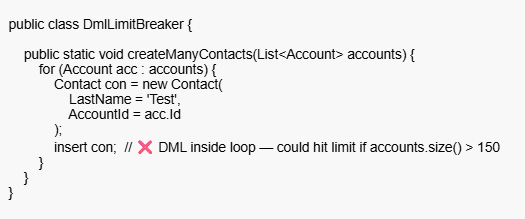
Take a look at the code snippet below — can you spot the problem?
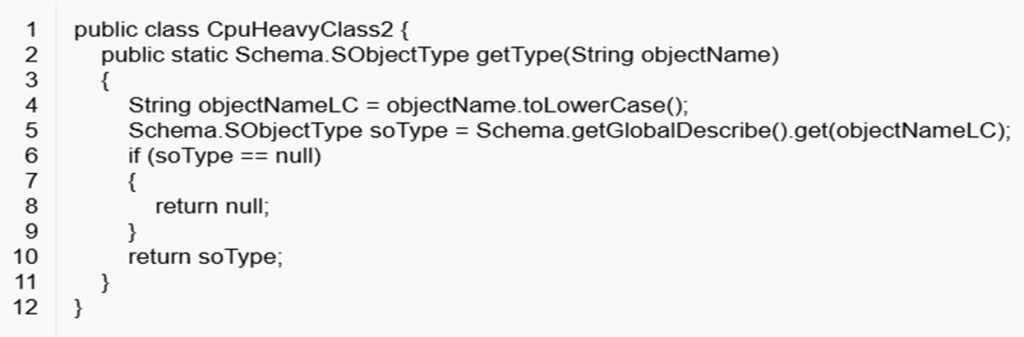
Hmm… let me guess — most of us will spot the static errors right away. But what about the runtime errors?
Issue
The getGlobalDescribe() method can cause performance issues as the schema of related objects grows larger.
ApexGuru Insight
Any guesses before I move on? Just kidding! 😄
You can use the forName method to get the instance of the object and then call getSObject() on it.
But hey, no need to spend hours digging deep — ApexGuru does all the heavy lifting for you.
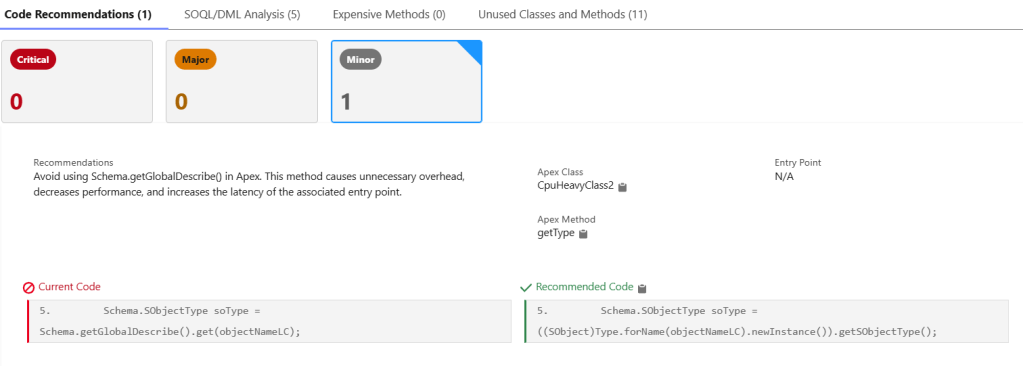
What about the below code snippet?
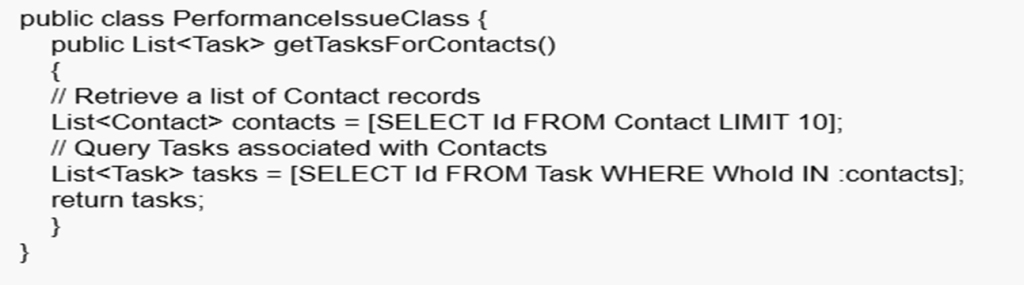
Issue
Using an IN-bind filter with a large list in a SOQL query can be expensive and inefficient. It may even cause query failures due to the query string exceeding Salesforce limits.
ApexGuru Insight
Use a Contact map to retrieve records instead of directly using a large list in the IN-bind clause. Then, leverage this map to process and drive your results efficiently.
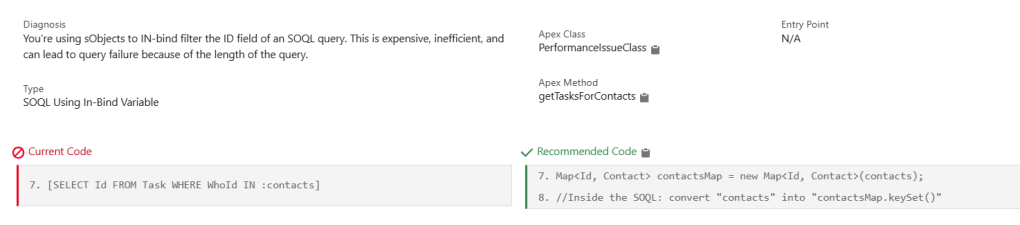
Wow — isn’t that powerful? It definitely makes code reviews much easier.
Of course, some might still debate this approach, right?
Static Error Insights
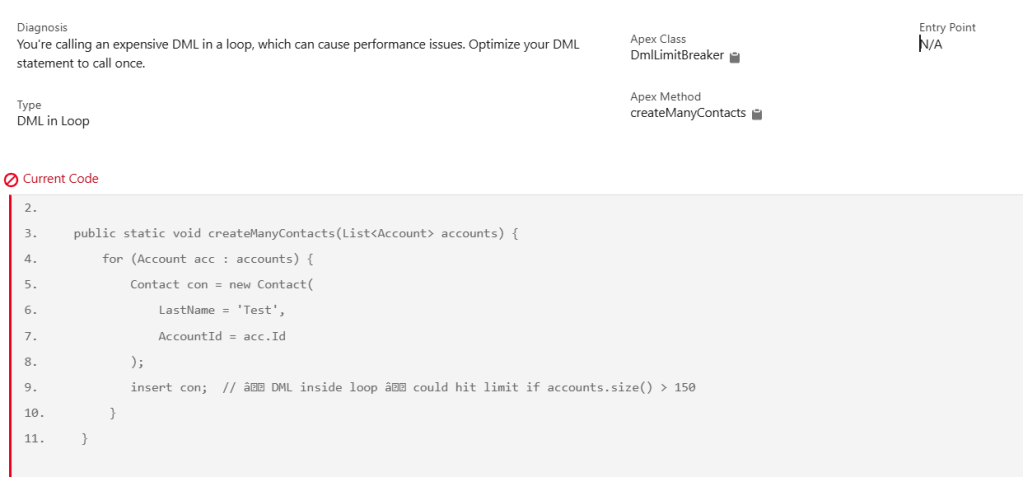
It’s not just about runtime insights — it also provides static analysis to catch issues early.
ApexGuru Insight
Enable ApexGuru
- Check Org Eligibility:
- Apex Guru is only available in Performance, Enterprise, and Unlimited Editions.
- Must be a Production or Full Copy Sandbox (because it uses actual telemetry data).
- Reach Out to Salesforce Account Executive (AE):
- Since it is a pilot, your AE needs to submit a request to enable it in your org.
- Mention explicitly that you want to join the Apex Guru pilot program.
- Salesforce Internal Team Review:
- Salesforce evaluates your org’s suitability for the pilot.
- If approved, they enable Apex Guru and share documentation/access.
- Enable Scale Centre:
- Go to Setup in your production org.
- Search for “Scale Center” in the Quick Find box.
- Click Scale Center Settings.
- Toggle on Enable Scale Center.
- Click Save.
- Enable ApexGuru Insights
- Once Scale Center is active
- In Setup, search for “ApexGuru” or “ApexGuru Insights”.
- Open ApexGuru Insights Settings.
- Enable the toggle: Enable ApexGuru Insights.
- Click Save.
- Access Apex Guru:
- Once enabled, go to Setup → Apex Guru.
- Review recommendations, code insights, and suggested improvements.
| Org Type | ApexGuru Availability |
|---|---|
| Developer Edition | ❌ Not Available |
| Scratch Org | ❌ Not Available |
| Sandbox (Developer) | ❌ Not Available |
| Sandbox (Full Copy) | ✅ Available (if pilot enabled) |
| Production Org (Enterprise/Unlimited/Performance) | ✅ Available (if pilot enabled) |
Coming Up Next
- ApexGuru Metrics
- Explore the key performance indicators and telemetry data captured by ApexGuru.
- Integration with CI/CD Tools
- Learn how ApexGuru can be leveraged to enhance automated quality checks in your CI/CD pipeline.
 Cloud With Abhi | Salesforce Tips, Code & Career