Evaluate Dynamic Formulas in Template Mode
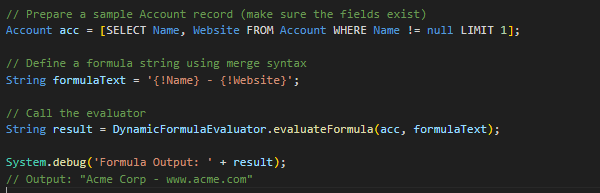
The parseAsTemplate() method evaluates a dynamic formula in template mode in apex.
Template Mode enables the use of merge field syntax ({!FieldName}) in formula strings, allowing for dynamic evaluation of field values at runtime. This approach simplifies string concatenation and makes the code more maintainable.
⚠️ Considerations
- Field References: Ensure that all fields referenced in the formula are included in the SOQL query; otherwise, the evaluation may fail.
- Case Sensitivity: Field names in the formula are case-sensitive. For example,
{!Name}and{!name}are considered different. - Error Handling: Implement appropriate error handling to manage scenarios where fields may be null or missing.

Evaluation
Specify an Org-Wide Enablement of Debug Logs During Metadata Deployment
By default, debug logs are not generated during metadata deployments, as they can increase test execution time. However, administrators can enable this feature through a specific setting, provided a debug log trace flag is active. If the DebuggingHeader is used during deployment, it will override this setting.
Availability:
This feature is available in Lightning Experience and Salesforce Classic (not in all orgs) for Enterprise, Performance, Unlimited, and Developer Editions.
How to Enable:
- Go to Setup > enter Apex Settings in the Quick Find box > enable Metadata Deployments can generate Debug Logs.
- To enable it programmatically, use the
enableDebugLogsDuringDeploymentfield inApexSettingsvia the Metadata API (see Metadata API Developer Guide).
 Cloud With Abhi | Salesforce Tips, Code & Career