Tag: ai

  • Salesforce Spring ’26: A Quiet Release That Changes How We Work

    Salesforce Spring ’26 is not loud.

    There are no dramatic UI overhauls, no “this changes everything” moments, and no features that force you to rewrite your architecture overnight.

    And yet, as someone working deeply with Salesforce Core, automation, metadata, and multi-org setups, I believe Spring ’26 is one of the most important releases in recent years.

    Not because of what it adds —
    but because of what it improves.

    This Release Is About Reducing Friction, Not Adding Features

    Most Salesforce orgs today don’t struggle because they lack features.
    They struggle because of:

    • Too many configurations spread across Setup
    • Automations that work but are hard to debug
    • Errors that surface only after users complain
    • Deployments that take longer than they should

    Spring ’26 quietly targets these exact problems.

    It’s a release focused on operational maturity.


    Setup Is No Longer Just for Power Users

    One of the most noticeable shifts in Spring ’26 is how Salesforce is rethinking Setup itself.

    Instead of assuming admins remember:

    • where a setting lives,
    • which permission controls what,
    • or which toggle affects which feature,

    Salesforce is moving toward a goal-driven setup experience.

    The idea is simple:

    You explain what you want to achieve, and Salesforce helps you get there.

    This doesn’t replace admin knowledge — it reduces unnecessary mental load.
    For experienced admins, it means less time navigating Setup and more time designing solutions.


    Automation Is Finally Easier to Maintain (Not Just Build)

    Flow has been powerful for years.
    But anyone working in real orgs knows the problem was never building flows — it was understanding them later.

    Spring ’26 improves:

    • Flow execution visibility
    • Runtime diagnostics
    • Post-deployment troubleshooting

    This matters a lot in enterprise environments where:

    • multiple teams touch automation,
    • ownership changes over time,
    • and issues are investigated weeks or months later.

    Salesforce is acknowledging something important:

    Automation success is measured after deployment, not at save time.


    Developers Get Practical Wins (Not Shiny Toys)

    For developers, Spring ’26 is refreshingly practical.

    Instead of introducing entirely new paradigms, Salesforce focuses on:

    • cleaner UI building blocks,
    • smarter test execution,
    • better separation between configuration and code.

    These changes may not look exciting in demos, but they:

    • speed up CI/CD pipelines,
    • reduce deployment fatigue,
    • and make large codebases easier to manage.

    If you work across multiple orgs or managed packages, you will feel this release.


    Errors Are Treated as Signals, Not Accidents

    Historically, Salesforce errors were:

    • scattered,
    • inconsistent,
    • and often invisible to admins.

    Spring ’26 changes that mindset.

    Errors are now something you:

    • monitor,
    • analyze,
    • and act on proactively.

    Centralized visibility into Lightning errors means:

    • fewer “it suddenly stopped working” tickets,
    • faster root-cause analysis,
    • better confidence in production changes.

    This is not a flashy feature — but it’s one of the most valuable ones.


    Security Tightening You Should Take Seriously

    Some Spring ’26 changes won’t break anything today — but they will break things if ignored.

    Salesforce is tightening:

    • certificate lifecycles,
    • connected app governance,
    • and permission granularity.

    This aligns Salesforce with modern security standards, even if it feels restrictive.

    If you manage:

    • integrations,
    • CI/CD users,
    • or third-party tools,

    this is the right time to review your setup — not when something fails unexpectedly.


    What Spring ’26 Intentionally Does Not Do

    Equally important is what Salesforce chose not to change:

    • Apex is not being replaced
    • Flow is not being forced into AI-only territory
    • Existing architectures are not being disrupted
    • Admins and developers are not being sidelined

    Spring ’26 respects existing investments.

    It evolves the platform instead of rewriting it.


    Why Spring ’26 Feels Different

    This release doesn’t chase buzzwords.

    It focuses on:

    • clarity over complexity,
    • stability over novelty,
    • and long-term maintainability over short-term excitement.

    For mature Salesforce orgs — especially those working on Core platform, automation at scale, and multi-org governance — Spring ’26 delivers real value.

    Sometimes the best releases are the ones that don’t shout.
  • ApexGuru – Boost Salesforce Code Quality

    – Intelligent Code Analysis & Recommendations for Apex

    What you will learn

    1. What is ApexGuru?
    2. Why ApexGuru?
    3. Who will benefit?
    4. Analysis with Live Examples?

    As our organization continues to expand its digital footprint, the role of Salesforce has become increasingly mission-critical. With multiple Salesforce instances supporting diverse business units, ensuring consistency, code quality, and performance has become both a challenge and an opportunity. Now is the time to seize that opportunity.

    What is ApexGuru?

    ApexGuru is an advanced platform purpose-built for Salesforce engineering teams. It offers real-time insights into code health, technical debt, and performance metrics. Unlike generic monitoring tools, ApexGuru is deeply integrated into the Salesforce development lifecycle, offering actionable intelligence tailored to our needs.

    Why ApexGuru?

    ApexGuru enables us to overcome these obstacles through:

    • Standardization Across Orgs: Enforce consistent coding and architectural standards.
    • Risk Mitigation: Identify performance bottlenecks, security vulnerabilities, and technical debt before they affect end users.
    • Productivity Gains: Empower development teams with clear insights and reduce time spent on code reviews and rework.
    • Strategic Visibility for Leaders: Provide dashboards and metrics that help leadership assess org health and allocate resources effectively.

    Features

    •For Developers/Reviewers:
    Catch issues early, improve skills, write cleaner code. Not only static but run-time errors as well.

    •For Architects:
    Enforce enterprise standards across teams

    •For Managers:
    Visibility into team code quality, faster reviews

    •For DevOps:
    Integrates into CI/CD tools for smoother deployments

    Examples:

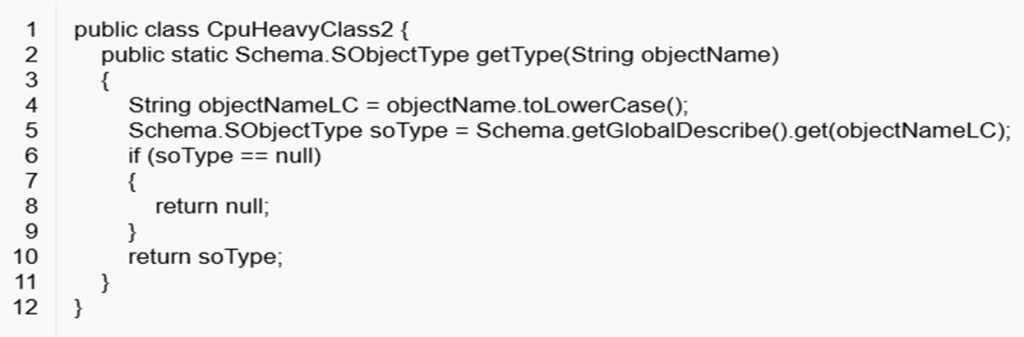
    Take a look at the code snippet below — can you spot the problem?

    Hmm… let me guess — most of us will spot the static errors right away. But what about the runtime errors?

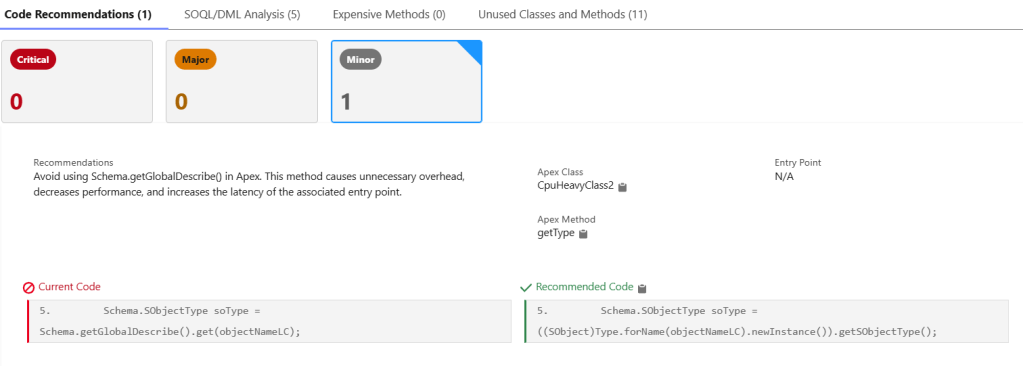
    Issue:

    The getGlobalDescribe() method can cause performance issues as the schema of related objects grows larger.

    ApexGuru Insight

    Any guesses before I move on? Just kidding! 😄

    You can use the forName method to get the instance of the object and then call getSObject() on it.

    But hey, no need to spend hours digging deep — ApexGuru does all the heavy lifting for you.

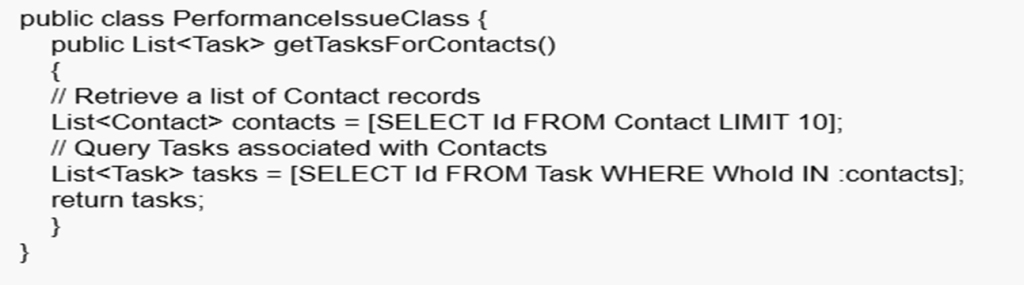
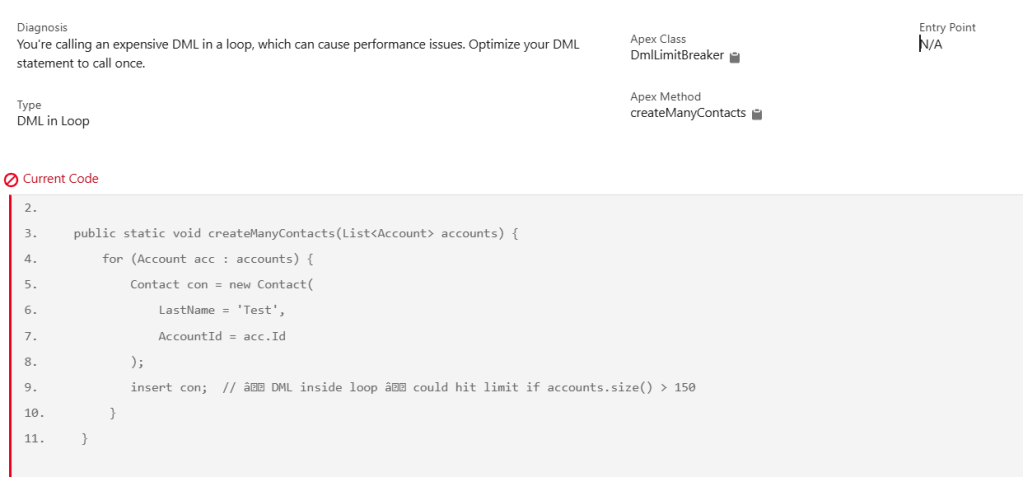
    What about the below code snippet?

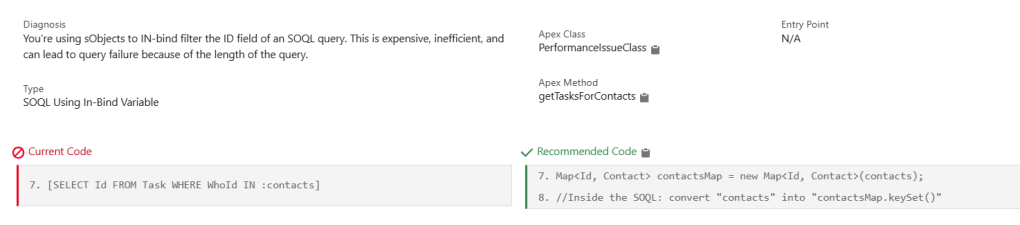
    Issue:

    Using an IN-bind filter with a large list in a SOQL query can be expensive and inefficient. It may even cause query failures due to the query string exceeding Salesforce limits.

    ApexGuru Insight

    Use a Contact map to retrieve records instead of directly using a large list in the IN-bind clause. Then, leverage this map to process and drive your results efficiently.

    Wow — isn’t that powerful? It definitely makes code reviews much easier.
    Of course, some might still debate this approach, right?

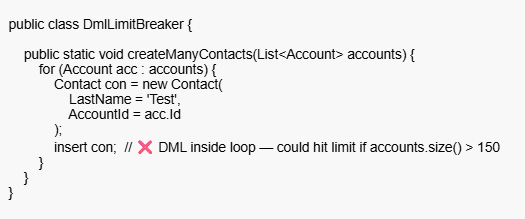
    Static Error Insights

    It’s not just about runtime insights — it also provides static analysis to catch issues early.

    ApexGuru Insight

    Enable ApexGuru

    1. Check Org Eligibility:
      • Apex Guru is only available in Performance, Enterprise, and Unlimited Editions.
      • Must be a Production or Full Copy Sandbox (because it uses actual telemetry data).
    2. Reach Out to Salesforce Account Executive (AE):
      • Since it is a pilot, your AE needs to submit a request to enable it in your org.
      • Mention explicitly that you want to join the Apex Guru pilot program.
    3. Salesforce Internal Team Review:
      • Salesforce evaluates your org’s suitability for the pilot.
      • If approved, they enable Apex Guru and share documentation/access.
    4. Enable Scale Centre:
      • Go to Setup in your production org.
      • Search for “Scale Center” in the Quick Find box.
      • Click Scale Center Settings.
      • Toggle on Enable Scale Center.
      • Click Save.
    5. Enable ApexGuru Insights
      • Once Scale Center is active
      • In Setup, search for “ApexGuru” or “ApexGuru Insights”.
      • Open ApexGuru Insights Settings.
      • Enable the toggle: Enable ApexGuru Insights.
      • Click Save.
    6. Access Apex Guru:
      • Once enabled, go to Setup → Apex Guru.
      • Review recommendations, code insights, and suggested improvements.
    Org TypeApexGuru Availability
    Developer Edition❌ Not Available
    Scratch Org❌ Not Available
    Sandbox (Developer)❌ Not Available
    Sandbox (Full Copy)✅ Available (if pilot enabled)
    Production Org (Enterprise/Unlimited/Performance)✅ Available (if pilot enabled)

    Coming Up Next

    1. ApexGuru Metrics
      • Explore the key performance indicators and telemetry data captured by ApexGuru.
    2. Integration with CI/CD Tools
      • Learn how ApexGuru can be leveraged to enhance automated quality checks in your CI/CD pipeline.