Hey folks, Abhi here!
I was listening to Marc Benioff this week, and one line stuck with me: “You’ve got to get your data right to get your AI right.”
Honestly? That might be the most admin thing a CEO has ever said.
Because here’s what I keep seeing. Teams get excited about Agentforce, spin up an agent in a sandbox, demo it to leadership, and then… it gives weird answers in production. Everyone blames the prompt. Or the model. Or “AI just isn’t ready yet.”
Nine times out of ten, it’s none of those. It’s the data. The duplicate Accounts, the picklist with “Other”, “other” and “OTHER”, the custom field nobody has touched since 2019.
So in this post, I want to break down what Benioff actually meant, why it lands squarely on us admins, and give you a practical checklist you can start on this week. No fluff. Let’s go.
The four layers Benioff talked about
In the clip, Benioff breaks enterprise AI into four connected layers. Here’s how I’d translate each one into admin language:
- Data is the foundation. Your records, fields, picklists, files. If this layer is messy, everything above it inherits the mess.
- Applications and semantics give the data business meaning. This is where “Status = Closed Won” actually means something. Think your data model, field definitions, validation rules, and Flows.
- Agents do the work. Agentforce reads from the two layers below and takes action.
- The interface is where people meet it all: Lightning pages, Slack, the agent chat window.
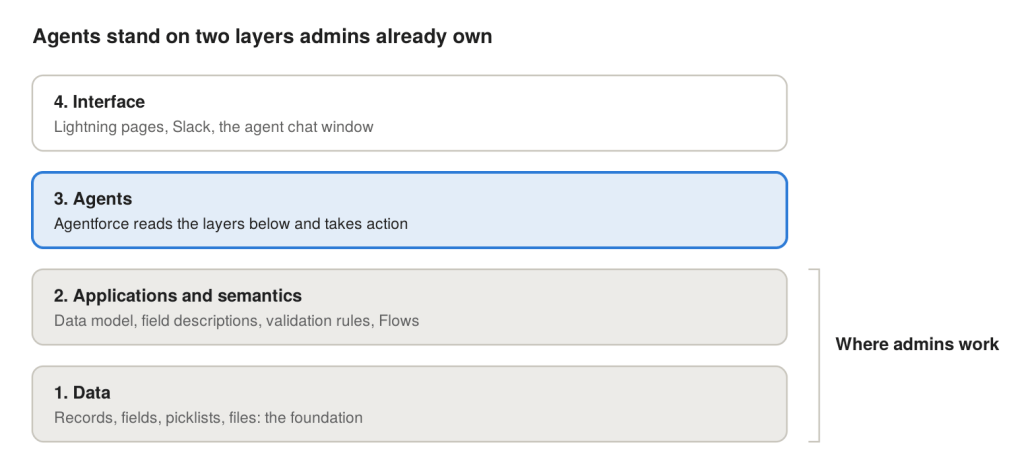
Notice where agents sit. Third. Not first. They stand on top of two layers that we, the admins, have been building and maintaining for years.
That’s the whole point. Building more agents is easy now. Making them useful, in a system the business can actually trust, is the hard part. And most of that hard part lives in layers one and two.
Why agents trip over messy data
Here’s the mental model I use: an agent reads your org the same way a brand-new hire does. Except it never asks “hey, which of these three Accounts is the real one?” It just picks one and answers with full confidence.
When a request comes in, Agentforce pulls context from whatever its running user can see: CRM records, Knowledge articles, prompt template merge fields, and Data 360 objects if you’ve wired them up. Then the model reasons over whatever came back. There’s no step in that pipeline that asks “is this data actually good?” Retrieval treats your org as the truth.
So a few classic admin headaches turn into real AI problems:
- Duplicates. Three Account records for one customer? The agent might summarise them like three different customers.
- Stale fields. This one is sneaky. An empty field gets skipped. A stale field gets quoted. If Renewal_Risk__c was last touched in 2024, the agent repeats it like it’s fresh news.
- Mystery fields. Two fields holding the same fact, and nobody remembers which one is “real”? The agent doesn’t know either.
- Old Knowledge articles. Your 2023 refund policy isn’t history to an agent. It’s an answer.
- Access gaps. If the running user can’t see some records, the agent quietly answers from a partial picture. No error. Just wrong.
And this isn’t just me being dramatic. Salesforce’s own 2026 State of Data and Analytics research found that data leaders estimate roughly a quarter of their organisation’s data is untrustworthy. Gartner has also forecast that through 2026, organisations will abandon 60% of AI projects that aren’t backed by AI-ready data.
The worst part? A broken Flow throws an error you can screenshot. An agent on bad data fails in fluent, confident English. Users catch it once, start double-checking everything, and then quietly stop using it.
Your admin checklist before the next agent
Good news: none of this needs a new license. Just reports, SOQL, Setup, and an honest afternoon. And don’t try to clean the whole org. Scope it to the objects, fields and articles your agent will actually touch.
- Turn on matching and duplicate rules for the agent’s core objects. Run the Duplicate Record Sets report, pick a survivor record, and merge the rest. Then keep the rules switched on so the mess doesn’t grow back.
- List every field the agent reads. Go through its topics, actions and prompt templates. For each field, check how fresh the values are with a quick report grouped by Last Modified Date.
- Kill or fix stale fields. If nobody maintains a field anymore, either fix the process that should update it or remove it from the agent’s grounding. Stale is worse than empty.
- Clean up picklists. Merge “Other”, “other” and “OTHER” into one value, deactivate retired values, and use restricted picklists so new junk can’t sneak in.
- Pick one source of truth per fact. Two fields storing the same thing? Choose one, give it an owner, and deprecate the other.
- Review Knowledge articles in scope. Archive the dead ones, update the old ones, and resolve any that contradict each other.
- Log in as the agent’s running user. Check permission sets, object access, field-level security and sharing. It should see everything the use case needs, and nothing beyond it.
- Test with your ugliest records. Don’t demo on clean sample data. Use the Account that just survived a merge, or the customer with the weird history. If the agent handles those, it’ll handle the rest.
If you only have time for three, do duplicates, stale fields, and the running user check. Those three alone fix most of the “why is the agent saying that?” moments I’ve seen.
The “semantics” layer: why descriptions suddenly matter
Remember layer two? This is the one admins tend to underrate.
For years, field descriptions and help text felt optional. A nice-to-have for documentation day that never came. With agents, they’re context. When an agent sees a field called Status_2__c with no description, it’s guessing. When it sees a clear description of what the field means and when it’s used, it can reason properly.
Salesforce is leaning hard into this too. Data Cloud was renamed Data 360 at Dreamforce 2025, and it’s now positioned as the data layer that gives Agentforce its context. On top of it sits Tableau Semantics, Salesforce’s semantic layer, which uses the Customer 360 Semantic Data Model to keep metric definitions consistent across clouds.
The idea, as Salesforce’s architecture team explains it, is simple: define the business logic once, in a governed place, instead of letting every agent and dashboard guess which columns mean “churn risk”. Then agents and human analysts read the exact same definition.
You don’t need Data 360 to start thinking this way, though. Inside your core org, the admin version of a semantic layer looks like:
- Field descriptions and help text on every field the agent touches. Write them like you’re explaining to a new hire.
- Clear, consistent labels and API names. No more Status, Status_New and Status_v2.
- Specific topic and action instructions in Agentforce. Instead of “check order status”, name the exact field and object to look at.
- Documented relationships. Make sure lookups and parent Accounts actually reflect how the business works.
It’s boring work. It’s also the work that turns a cool demo into something people trust on a Monday morning.
Wrapping up
Here’s my honest take. Agentforce isn’t magic, and it isn’t broken either. It’s a mirror. It reflects whatever state your org is in, just faster and with more confidence.
That’s actually great news for admins. The skills that make agents work are the skills we already have: data quality, clean data models, good security, clear documentation. The stuff we’ve been asking for budget for since forever just became the most important part of the AI story.
So here’s my challenge for this week. Pick one process your team wants an agent for. Spend one afternoon running the checklist above against only that process. Write down what you find. Either you’ll go into the pilot with real confidence, or you’ll have found the actual project before it burned a quarter.
And I want to hear from you: what’s the messiest part of your org’s data? Duplicates? Mystery fields? A Knowledge base from 2019? Drop it in the comments. I read every one.
Until next time, keep it clean, folks! 🚀
Sources
- Marc Benioff at The Six Five Summit (YouTube Short)
- Salesforce: Build a Semantic Layer Your AI Agents Can Reason Over
- Salesforce: Data and Analytics Trends for 2026
- Gartner: Lack of AI-Ready Data Puts AI Projects at Risk
- Salesforce Ben: Data Cloud renamed to Data 360
- Salesforce Dictionary: Why Agentforce Adoption Is Stalling

