Hey folks, Abhi here!
Quick one today — let’s demystify “MCP Server” with a simple example, because I keep seeing people throw the term around without explaining what actually happens under the hood.
The example
Say you type this into Claude:
“Show me open cases for Acme”
Claude doesn’t have your Salesforce data memorized. So here’s what happens in real time, step by step:
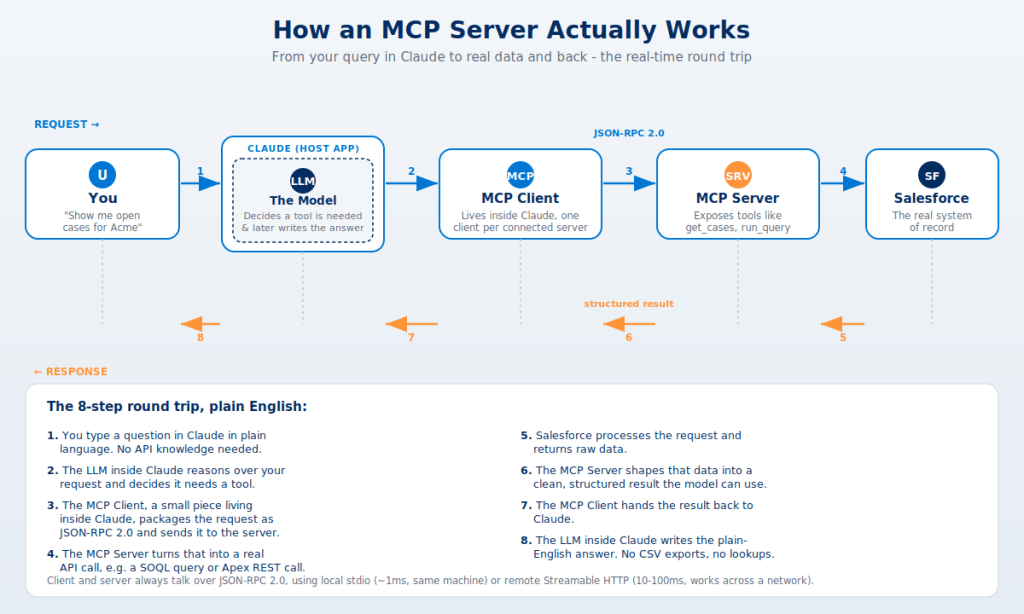
- You ask the question in plain English.
- The LLM inside Claude reads it and realizes — “I need a tool for this, I can’t answer from memory.”
- Claude’s MCP Client (a small piece living inside the app) packages that need into a JSON-RPC 2.0 message and sends it to the right MCP Server.
- The MCP Server turns that generic request into something Salesforce understands — think a SOQL query or an Apex REST call.
- Salesforce runs it and returns raw data.
- The MCP Server shapes that raw data into a clean, structured result.
- It travels back through the MCP Client, into Claude.
- The LLM writes the plain-English answer you see on screen — no CSV export, no manual lookup.
Why this matters for admins
That whole 8-step round trip happens in a second or two, every single time. The MCP Server is the translator — it’s the only piece that actually knows how to talk to Salesforce. The MCP Client is just a router. The LLM is the only part actually “thinking” — deciding a tool is needed, and later turning the result into words.
This is the exact plumbing sitting under every “AI agent talks to Salesforce” demo you’ve seen lately, including Agentforce. If you’re evaluating a third-party MCP server for your org, this is also where you should be asking security questions — who built the server, what does it have access to, and how is that JSON-RPC channel authenticated.
That’s it — MCP in one example. I’m diving into Headless 360 next, so more on that soon. Catch you in the next one!


Leave a Reply